Nominait: AI-Powered Recruitment Platform
A dual-sided HR platform built to improve hiring outcomes through AI-assisted profiles, transparent match scoring and structured interviews. Recruiters search and contact candidates; candidates onboard into a profile and interview flow that feeds the matching engine.
Client
Confidential client
Deliverables
Product strategy
UX/UI design
Interaction design
Design system
Prototyping
Handoff
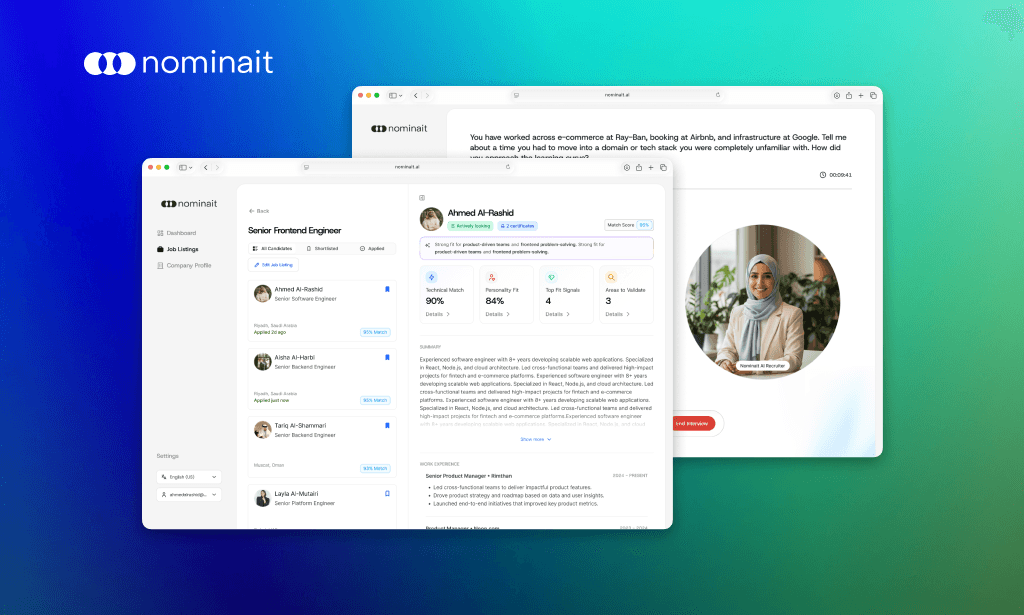
Two journeys, one matching engine
Recruiters search, shortlist and contact. Candidates build a profile and sit a short AI interview. Everything either side does feeds the same score, which is why the score has to be explainable on both.
01 Context
Enterprise hiring that has to be fast and auditable at once.
Nominait targets mid-to-large organizations in Saudi Arabia, where hiring is often slow, manual and compliance-heavy.
Workflows run through several stakeholders: CHRO, TA leads, hiring managers and operations. A decision has to be both quick and defensible afterwards, and that tension shaped every screen here.
02 The problem
Three failures, and the third is the one that kills adoption.
Setup friction and weak input quality are solvable with better forms. The trust barrier is not. It is an interface problem.
01
High setup friction
Creating company profiles and job requirements takes far longer than anyone budgets for.
02
Low-quality signals
Job descriptions and candidate inputs are inconsistent, which weakens matching before it starts.
03
The trust barrier
Teams need control, reversibility and a clear explanation, not a black box that returns a ranking.
03 Success criteria
Measurement designed before the build, not retrofitted to it.
The platform had not launched while I was on it, so there are no post-launch numbers to report and I am not going to invent any. What I did own was the measurement design: the metrics the team would judge the product by, defined early enough that instrumentation could be specified alongside the screens.
Leading indicators split by side. Recruiter: onboarding completion, share of roles published, shortlist actions, match deep-dives opened, contact unlocks. Candidate: profile completeness, AI interview completion, saved jobs, match deep-dives opened.
Time to validated match: from first entry to the moment a user can confidently decide to shortlist, contact, save or proceed.
04 Design principles
Four rules, and the AI ones are not negotiable.
Where speed and control conflicted in this product, control won, because a reversible mistake is survivable and an unexplained one is not.
01
Time to first value
Get users to a ready-to-match state quickly, without long forms up front.
02
AI with user control
AI suggests; users approve, edit or revert. Never the other way round.
03
Explainability by design
Show why a score exists and what to do about it, at two levels of depth.
04
Enterprise reality
Collaboration, role separation and auditable flows, because several people own one hire.
05 Recruiter activation
A usable company profile fast, without handing over control.
Onboarding opens on role selection, hiring or job seeking, so the experience personalises from the first click. Company setup then generates a first draft from publicly available information and turns it into a structured profile.
To make that trustworthy rather than alarming, the UI pairs an AI Profile Agent panel with a live preview, reversible edits, and a manual edit modal as the escape hatch. The pattern repeats everywhere AI writes: suggest, preview, approve, undo, edit by hand.
There is also an explicit option to skip job creation, because in real organizations account setup and job posting are usually owned by different people.

Sign-in
The first screen, kept ordinary on purpose.

Hiring, or looking
One question that decides which of the two products someone sees.

Onboarding overview
Clear progress and step framing, so the setup has a visible end.

Company profile, drafted
Extracted from public information and presented as a structured draft to approve.

Company profile, refined
The second pass, where the draft becomes the organization’s own words.
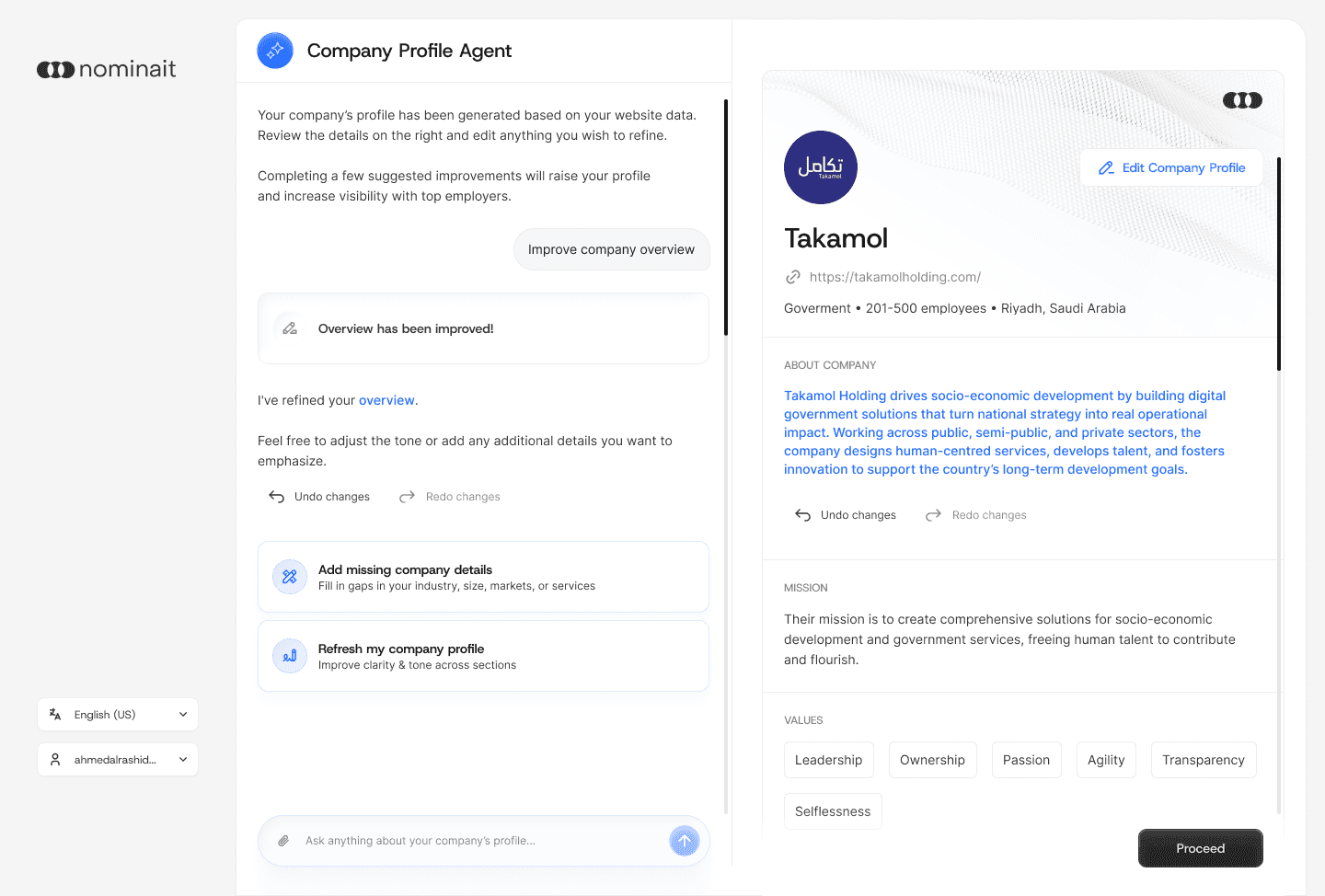
Agent beside preview
The panel proposes, the preview shows the consequence, and undo is always one click away.

Role definition
The same suggest-preview-approve pattern applied to a job requirement.

Role definition, expanded
Requirements broken out so a hiring manager can argue with a specific line.
06 Matching and review
Explainable shortlists, because recruiters have to justify them.
Job listings act as an operational hub: active against draft, with quality gates like “needs review”. Inside a role, candidates carry a visible match score and a lightweight shortlist action for building a working set.
To avoid a black box, explanation works at two depths: inline insights for rapid scanning, and a full job-match view for deep dives and stakeholder alignment. Interview-focus hints turn model output into something to actually ask, and documents stay in the same flow so the recruiter never leaves to check a file.

The shortlist, scored
Match score visible on every row, so scanning is a ranking task rather than a reading task.

One level deeper
AI summary, match breakdown and improvement areas, without leaving the list.
07 Candidate activation
High-signal profiles, with as little typing as possible.
Candidates sign in with LinkedIn to import identity and work history, then upload a resume to enrich it. Instead of long forms, a Profile Agent refines the summary and skills against a live preview.
The agent is task-based, offering “improve summary”, “add missing skills” and “rewrite profile”, which avoids the blank-chat problem and gives people an obvious next action.
A short AI interview then captures behavioural signal that keywords cannot. It sits after profile generation deliberately, so candidates understand the purpose and feel prepared; microphone permission is asked explicitly, with the option to skip and finish later.

LinkedIn as the fast lane
Identity and work history imported rather than retyped.

Expectations, set early
Step framing so the candidate knows how long this will take.

Imported, then checked
Nothing is taken as true until the candidate confirms it.

Resume parsing
The second source of signal, merged into the same profile.

Tasks, not a chat box
Improve summary, add missing skills, rewrite profile: concrete actions instead of a cursor.

The escape hatch
Manual editing is always available, which is what makes the AI safe to try.
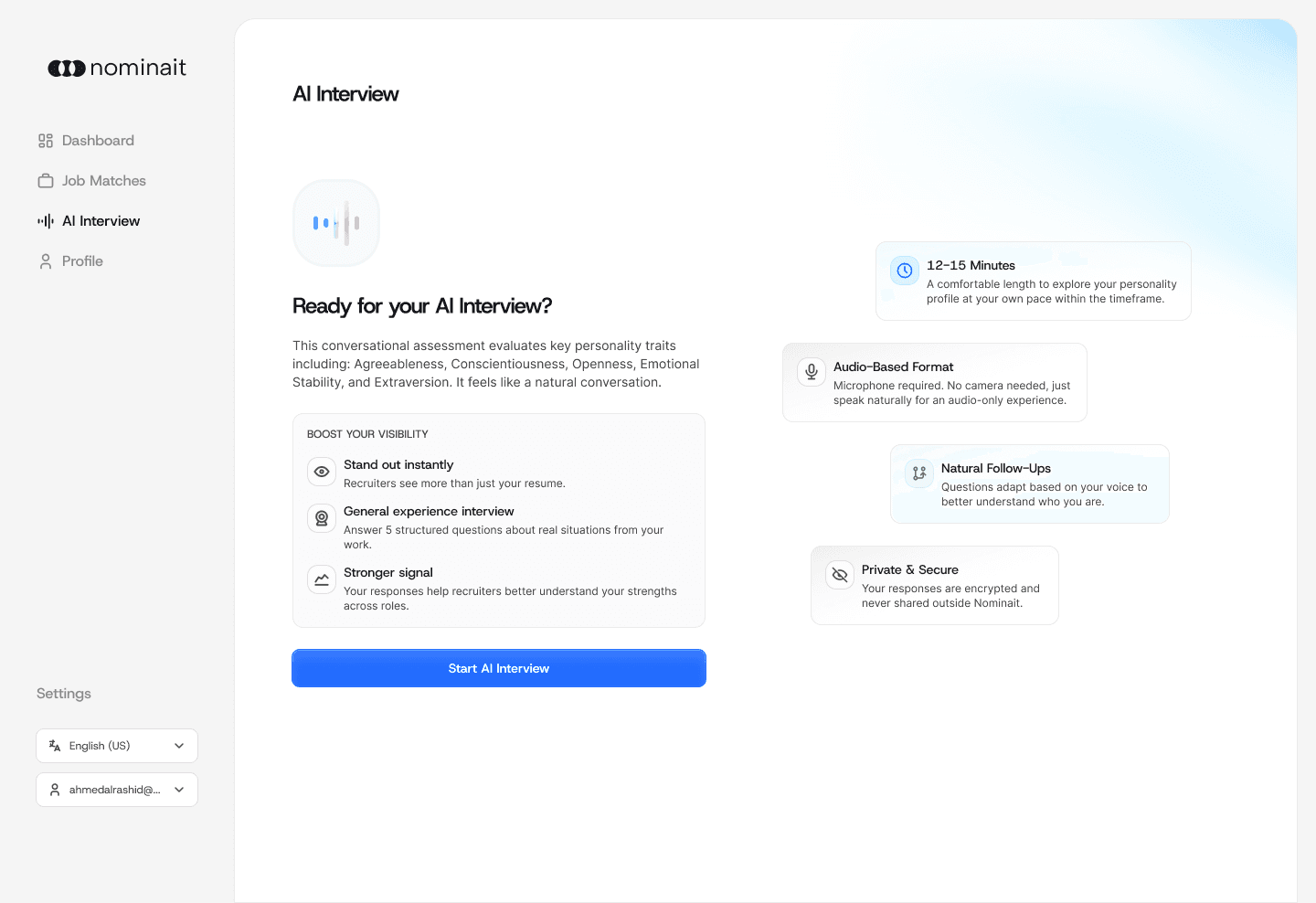
Interview prep
What is about to happen, and why it improves the match.

The interview itself
Behavioural questions capturing communication and work-style signal.
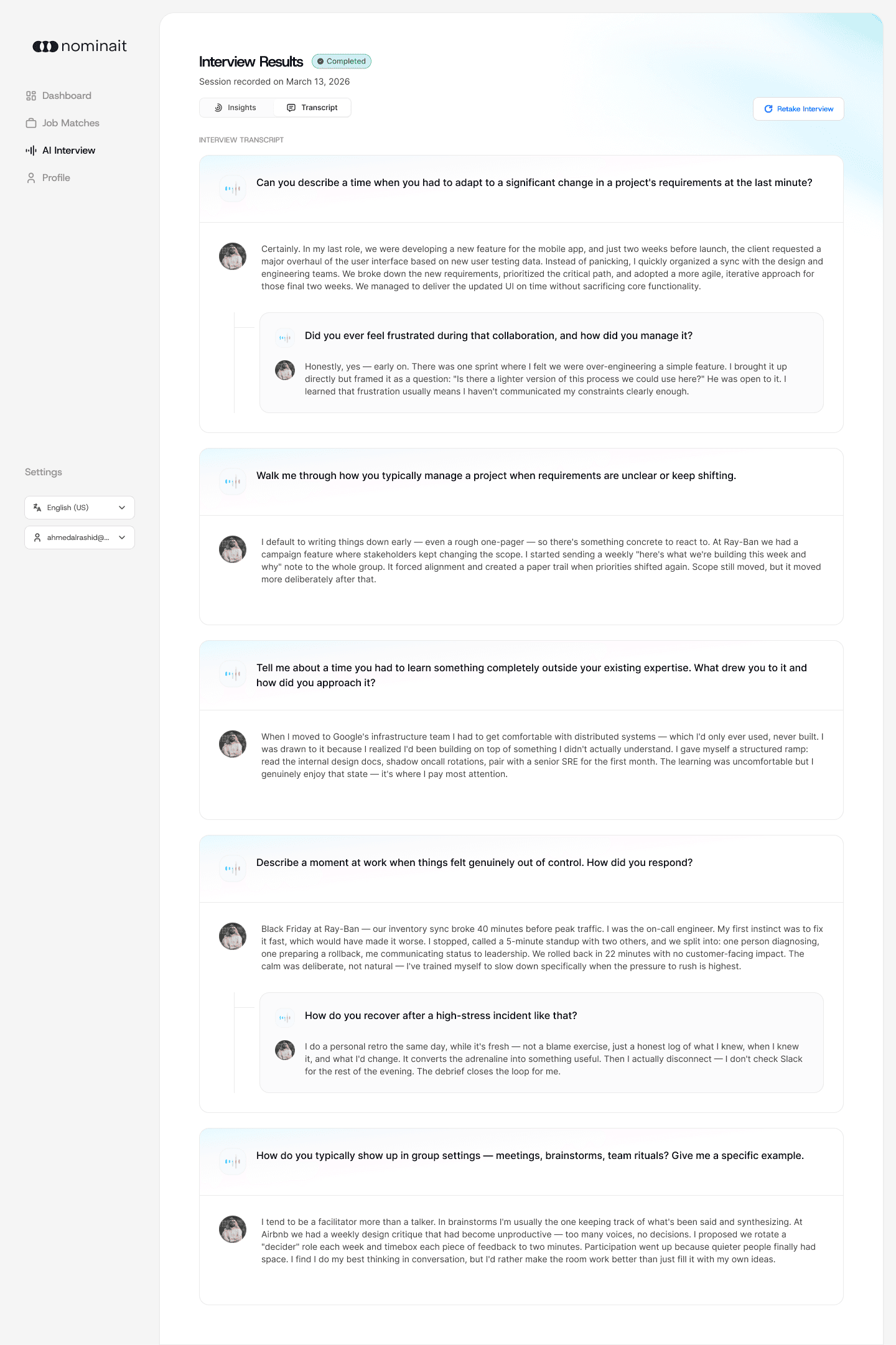
The transcript, returned
Results and full transcript go back to the candidate, so the interview is something they own rather than something done to them.
08 Candidate matches
A coach, not a ranked list.
The dashboard reinforces the product loop of improving profile quality, getting better matches, validating fit and preparing for interviews, which is why “improve your profile” is the most prominent action on it.
In job matches, each role shows a match score with an expand pattern that reveals the AI summary and a structured breakdown: technical fit, culture and personality, the supporting evidence, and both strengths and growth areas. Interview guidance turns that into what to emphasise and what to prepare.

Matches, all and saved
The same scan pattern the recruiter gets, pointed the other way.

Strengths and gaps
Evidence for the score, and the specific thing to work on before applying.
09 What I owned
Both sides, and the patterns that hold them together.
I designed the end-to-end flows for recruiter and candidate, covering activation, matching and review, plus the reusable patterns underneath them.
Specifically:
The AI-assisted editing pattern: suggest, preview, approve, undo and redo, manual edit
A two-depth explainability model, scan inline then deep dive in a modal, used on both sides
Information architecture for job listings, candidate review and match breakdown
The product quality loop: better profile, better matches, better decisions
The monetisation layer built around tokenised contact unlocks
10 What I would improve next
Where I would take it with more time.
The gaps here are known and were sequenced, not overlooked.
In priority order:
Score calibration: clearer interpretation of high, medium and low with thresholds and worked examples
The end-to-end pipeline: match, outreach, interview scheduling, offer
Experimentation: A/B tests on onboarding step order and AI interview placement
An interviews feed, so candidates can pick interviews matched to their profile and target roles
Next project